Customer exits purchase document checks
Entering the enhancement
In the created project under Enhancement assignments enter the following enhancement: MM06E005
Include ZXM06U44 (function EXIT_SAPMM06E_013) (purchase document)
* =====================================================================* Start: AEB Compliance Check* ---------------------------------------------------------------------INCLUDE /AEB/CMP_START_PD_ONL_CHECK.
* ---------------------------------------------------------------------
* End: AEB Compliance Check
 * =====================================================================
Activate the created include calls
Make the relevant entries for all required includes and activate them. Then return to the project overview and activate it ( ).
).

If the red warning icons have been replaced by green dots, the project has been correctly activated.
Implementation screens of enhancement MM06E005 (purchase documents)
SAP® offers six screen exits in the extension MM06E005 for purchase documents. The screens for these exits must be implemented.
Double-click on the corresponding screen exit.
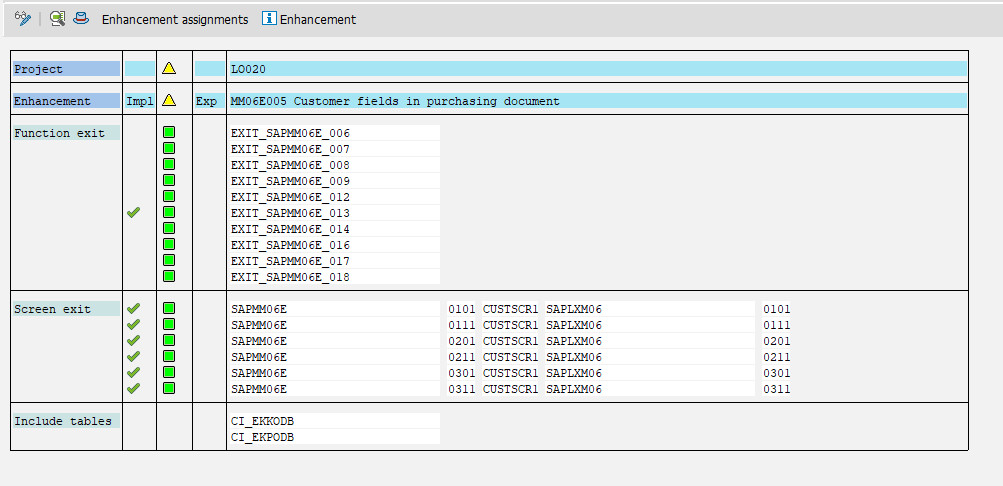
Confirm the system message that follows.
The Screen Painter is then displayed. Enter the following:
- Enter brief description
- Select Subscreen as the screen type.
- Leave all other field values as is.
- Click Save to continue.
- Enter the development class or package.
- Activate the screen ()
- The screen exit is now implemented.
All six screens of the exit must be implemented in this manner, as interruptions in SAP® may otherwise result.